
Flip Card
A flip card is a panel that can be rotated to display additional content at the back of the panel. As such, a flip card is an alternative way of expanding content. The flipping of the card is typically triggered by:
- Mouse hover and keyboard focus, or
- Pressing a button on the visible side of the card.
For compliance to WCAG 2.2, the following four success criteria are especially relevant:
- 2.1.1 Keyboard : the keyboard focus can be moved to the flip card and the flip action triggered via keyboard. The action can trigger directly on focus or when the Enter or Spacebar keys are pressed.
- 4.1.2 Name, Role, Value : both sides of the flip card are accessible via screen reader and the flip action (if triggered by a button) is conveyed via text or markup.
- 1.4.13 Content on Hover or Focus : for flip cards that flip on mouse hover or keyboard focus: pressing the Escape key flips the card back to the state it was in before the interaction.
- 2.4.7 Focus Visible : links and buttons on the hidden side of the flip card cannot gain keyboard focus, or if they can, the focus triggers the flip action so the focused element becomes visible.
The implementations below are two examples of WCAG compliant flip cards.
Button trigger flip card
This flip card is implemented as typical expanding content: the trigger is a button with an 'aria-expanded' attribute and the expanding content (the back of the card) is placed in the DOM sequence immediately after the trigger. When the back is displayed, the value of 'aria-expanded' is "true" and when hidden the value is "false". The trigger buttons label is "flip card".
When the front of the card is showing, the back is not available via screen reader, as it is hidden via the CSS rule "display:none". However, when the back is showing, the hidden front remains available via screen reader, as it is hidden via a CSS rotation. Therefore, from a screen reader user's perspective, the only change in content is the expansion/collapse of the back.
Eastern rosella
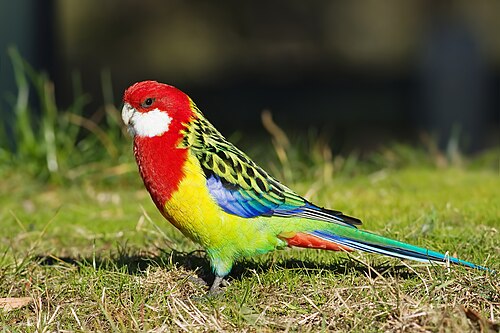
The eastern rosella (Platycercus eximius) is a parrot native and endemic to south-eastern Australia.
It was first introduced to New Zealand in cages, which then both intentionally released and accidentally escaped into the wild and has been found establishing mainly in the North Island (notably in the northern half of the island, Taranaki, Waikato and in the Hutt Valley) and in the hills around Dunedin in the South Island since the early 20th century.
Rainbow lorikeet
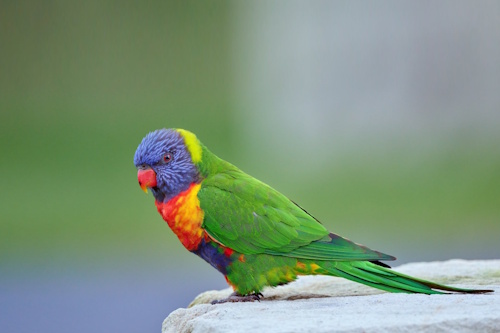
The rainbow lorikeet (Trichoglossus moluccanus) is a species of parrot found in Australia. It is common along the eastern seaboard, from northern Queensland to South Australia. Its habitat is rainforest, coastal bush and woodland areas. Six taxa traditionally listed as subspecies of the rainbow lorikeet are now treated as separate species (see Taxonomy).
Rainbow lorikeets have been introduced to Perth, Western Australia; Tasmania; Auckland, New Zealand; and Hong Kong.
Galah
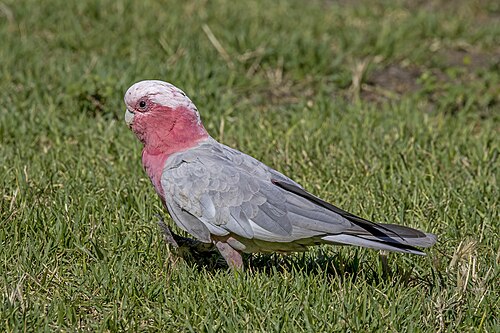
The galah (Eolophus roseicapilla), is an Australian species of cockatoo and the only member of the genus Eolophus.
The galah is adapted to a wide variety of modified and unmodified habitats and is one of Australia's most abundant and widespread bird species. The species is endemic to mainland Australia. It was introduced to Tasmania, where it is now widespread, in the mid-20th century and much more recently to New Zealand.
In the DOM sequence, the button is placed above the back of the card; however, visually, the button is positioned below this content. This means the visual focus outline would move from the bottom of the card up to the top of the card (if there are links or buttons in the content) and this is not a logical direction.
To remedy this, the button itself does not show any visual change on keyboard focus and instead, the entire card shows the focus outline. This ensures the visual keyboard focus order is logical, as it moves from the card into the content of the card.
Markup and code example
HTML
<div class="
<div class="
<h3>
Eastern rosella
</h3>
<img src="
</div>
<button aria-label="
<div class="
<p>The <b>eastern rosella</b> (<i> <b>Platycercus eximius</b></i>) is a
<a href="
parrot
</a>
native and endemic to south-eastern
<a href="
Australia
</a>
.
</p>
<p>
It was first introduced to
<a href="
New Zealand
</a>
in cages, which then both intentionally released and accidentally escaped into the wild and has been found establishing mainly in the North Island (notably in the northern half of the island, Taranaki, Waikato and in the Hutt Valley) and in the hills around Dunedin in the South Island since the early 20th century.
</p>
</div>
</div>
</div>
CSS
background-color: transparent;
width:
height:
border:
.card {
position: relative;
width:
height:
border-radius:
outline-offset:
transition-duration:
transform-style: preserve-3d;
perspective:
/*Outline on .card animates in Chrome, so instead place outline on .front and .back*/
&:has(button:focus-visible) {
.front, .back{
outline:
}
}
.front, .back {
position: absolute;
width:
height:
border-radius:
outline-offset:
overflow: hidden;
-webkit-backface-visibility: hidden;
backface-visibility: hidden;
}
.back {
transform: rotateY(
overflow-y: auto;
display: none;
}
button {
position: absolute;
left:
right:
bottom:
height:
z-index:
border:
outline:
padding:
background-color: transparent;
background-image: url('data:image/svg+xml;utf8,<svg xmlns="http://www.w3.org/2000/svg" viewBox="0 0 97 89"><path style="stroke:rgb(9,109,150);stroke-width:14;fill:none" d="M0,82 L75,82 C85,82 90,77 90,67 L90,47 C90,37 85,27 75,27 h-35"/><path style="fill:rgb(9,109,150)" d="M15,27 L53,0 53,55 Z"/></svg>');
background-size:
background-repeat: no-repeat;
background-position: center right
&:hover {
background-color: transparent;
box-shadow: none;
transform: none;
}
}
/*General styling */
.front, .back {
padding:
background-color: #F6FCFE;
border:
h3{
width: fit-content;
margin:
}
img {
width:
}
}
}
&.moving {
pointer-events: none;
.card .back {
display: block;
}
}
&:has(button[aria-expanded="true"]) {
.card {
transform: rotateY(
/*Ensure the back remains visible after "moving" class is removed*/
.back{
display: block;
}
}
}
}
JavaScript
const flipCardClick
for
const Back
const Btt
flipCard
//Ignore if a link was clicked
if
flipCard
if
Btt
Btt
flipCard
//If focus is moved to .back after button is pressed, move it back to the button
if
Btt
flipCard
Hover and focus trigger flip card
In this flip card, the front and the back are available via keyboard and screen reader, regardless of the state of the card. Therefore, there is no functionality from a screen reader perspective, only static content, as the screen reader will read the front of the card first, followed by the back of the card.
To provide keyboard access to the card, the card shows the back when it gains keyboard focus. This also ensures the keyboard focus is visible (i.e. when sighted keyboard-only users press the Tab key to move focus through the content, the link or button that has focus will be visible).
Users of screen magnification software typically move the zoomed viewport via the mouse cursor (i.e. the user can only see content that is close to the cursor); however, hovering the cursor over a card flips it, so the user cannot see the front. To remedy this, users can press the Escape key to flip the card again and reveal the front, without having to move the cursor away.
Superb fairywren
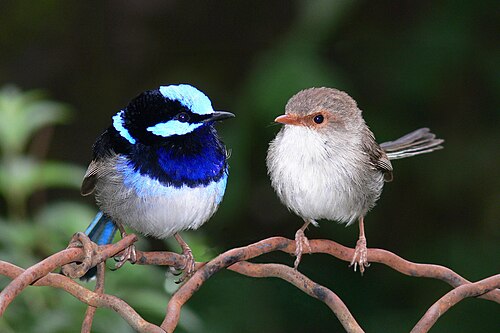
The superb fairywren (Malurus cyaneus) is a passerine bird in the Australasian wren family, Maluridae, and is common and familiar across south-eastern Australia.
It is a sedentary and territorial species, also exhibiting a high degree of sexual dimorphism; the male in breeding plumage has a striking bright blue forehead, ear coverts, mantle, and tail, with a black mask and black or dark blue throat.
Crimson rosella
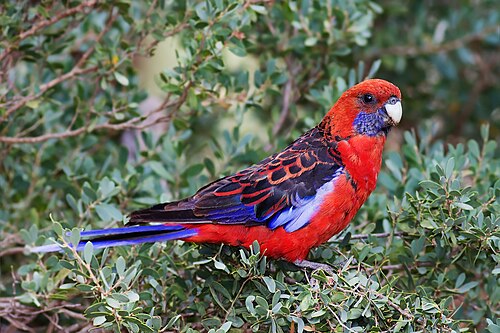
The crimson rosella (Platycercus elegans) is a parrot native to eastern and south eastern Australia which has been introduced to New Zealand and Norfolk Island. It is commonly found in, but not restricted to, mountain forests and gardens.
The species as it now stands has subsumed two former separate species, the yellow rosella and the Adelaide rosella. Molecular studies show one of the three red-coloured races, P. e. nigrescens, is genetically more distinct.
Sulphur-crested cockatoo
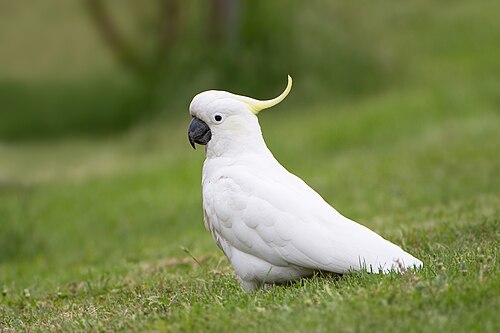
The sulphur-crested cockatoo (Cacatua galerita) is a relatively large white cockatoo found in wooded habitats in Australia, New Guinea, and some of the islands of Indonesia. They can be locally very numerous, leading to them sometimes being considered pests.
A highly intelligent bird, they are well known in aviculture, although they can be demanding pets.
Markup and code example
HTML
<div class="
<div class="
<h3>
Superb fairywren
</h3>
<img src="
</div>
<!-- add tabindex="0" if the back does not contain links or buttons -->
<div class="
<p>
The <b>superb fairywren</b> (<i><b>Malurus cyaneus</b> </i>) is a
<a href="
passerine
</a>
<a href="
bird
</a>
in the
<a href="
Australasian wren
</a>
family, Maluridae, and is common and familiar across south-eastern Australia.
</p>
<p>
It is a sedentary and territorial species, also exhibiting a high degree of sexual dimorphism; the male in breeding plumage has a striking bright blue forehead, ear coverts, mantle, and tail, with a black mask and black or dark blue throat.
</p>
</div>
</div>
</div>
CSS
background-color: transparent;
width:
height:
border:
.card {
position: relative;
width:
height:
border-radius:
outline-offset:
transition-duration:
transform-style: preserve-3d;
perspective:
.front, .back {
position: absolute;
width:
height:
border-radius:
overflow: hidden;
}
.back {
outline-offset:
transform: rotateY(
overflow-y: auto;
-webkit-backface-visibility: hidden;
backface-visibility: hidden;
}
.front, .back {
padding:
background-color: #F6FCFE;
border:
h3{
width:fit-content;
margin:
}
img {
width:
}
}
}
&:hover .card:not(.escape){
transform:rotateY(
}
.card:has(:focus-visible):not(.escape){
transform:rotateY(
}
}
JavaScript
document
if
const hoverCard
const focusCard
if
hoverCard
hoverCard
hoverCard
if
focusCard
focusCard
focusCard
Terms of Use
This software is being provided "as is" - without any express or implied warranty. In particular, me2 Accessibility does not make any representation or warranty of any kind concerning the reliability, quality, or merchantability of this software or its fitness for any particular purpose. In addition, me2 Accessibility does not guarantee that use of this tool will ensure the accessibility of your web content or that your web content will comply with any specific accessibility standard.

This work is licensed under a
Creative Commons License